Posts

Featured Posts

Start Your Journey with Linux Command Line

Image
Start Your Journey with the Linux Command Line: A Comprehensive Guide Whether you are a software developer, system administrator, analytics engineer, or cybersecurity enthusiast, mastering the Linux command line (terminal) is one of the single most effective skills you can acquire. While graphical user interfaces (GUIs) offer visual convenience, the command line interface (CLI) delivers unmatched speed, fine-grained system control, and seamless automation capabilities. Linux Command Line This tutorial breaks down more than 35 core Linux commands into structured, practical modules complete with real-world examples, flags, and command-chaining techniques. By building muscle memory around these fundamentals, you will elevate your daily technical workflow from basic navigation to advanced command orchestration. Why Learn the Command Line? The Linux CLI is not merely a legacy tool—it remains the foundation of modern cloud architecture, server maintenance, DevOps pipelines, and enterp...

Python LAB: Comparison operators and conditional execution

Image
PCAP LAB: Comparison operators and conditional execution Comparison Operators If you're taking PCAP - Programming Essentials In Python , you may have encountered this question in LAB: Comparison operators and conditional execution Scenario Spathiphyllum, more commonly known as a peace lily or white sail plant, is one of the most popular indoor houseplants that filters out harmful toxins from the air. Some of the toxins that it neutralizes include benzene, formaldehyde, and ammonia. Imagine that your computer program loves these plants. Whenever it receives an input in the form of the word Spathiphyllum, it involuntarily shouts to the console the following string: "Spathiphyllum is the best plant ever!" Write a program that utilizes the concept of conditional execution, takes a string as input, and: prints the sentence "Yes - Spathiphyllum is the best plant ever!" to the screen if the inputted string is "Spathiphyllum" (upper-case) prints "No, I wa...

Python 2.6.1.11 LAB: Operators and expressions

Image
 A Simple Python Code to Evaluate the End Time Operators and Expressions If you're taking PCAP - Programming Essentials In Python , you may have encountered this question in 2.6.1.11 LAB: Operators and expressions asking you for a code to evaluate end time. It goes like this: Scenario Your task is to prepare a simple code able to evaluate the end time of a period of time, given as a number of minutes (it could be arbitrarily large). The start time is given as a pair of hours (0..23) and minutes (0..59). The result has to be printed to the console. For example, if an event starts at 12:17 and lasts 59 minutes, it will end at 13:16. Don't worry about any imperfections in your code - it's okay if it accepts an invalid time - the most important thing is that the code produce valid results for valid input data. Test your code carefully. Hint: using the % operator may be the key to success. Solution with Comments: hour = int(input("Starting time (hours): ")) #12 mins = ...

Python Game - Dragon Cave Game

Image
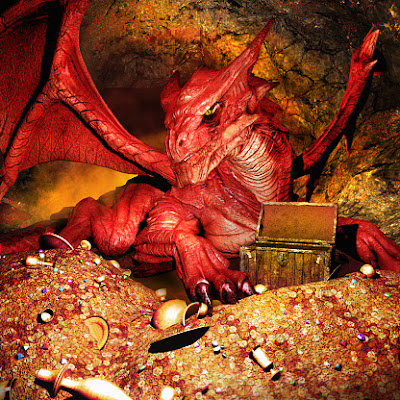
 Python for Beginners: Build a "Dragon Realm" Game🐲 Python Game - The Dragon Cave Are you looking for a fun way to practice your Python skills? This short game—originally featured by Al Sweigart in Invent Your Own Computer Games with Python—is a fantastic way to understand how programs make decisions. The Story You are in a land full of dragons. In front of you, you see two caves. In one cave, the dragon is friendly and will share his treasure. The other dragon is greedy and hungry , eating anyone on sight! The Twist: The "safe" cave is randomized every single time you play. Even if you choose Cave 1 twice, the outcome might be different. This is the power of the random module! Key Programming Concepts Used To make this game work, we use four essential Python features: import random & time: We use modules to give the program "superpowers." random allows the computer to make a choice, and time creates suspense by pausing the text. User-Defined Function...

Empathy vs Sympathy

Image
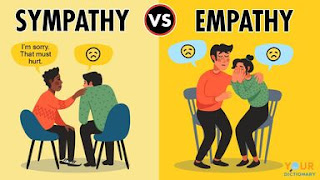
 Empathy vs Sympathy Empathy vs Sympathy My favorite line from Brené’s TED talk? “Rarely can a response make something better, what makes something better is connection .” What is the difference between Empathy and Sympathy? First, we need to know that Empathy and sympathy are two related but distinct concepts. Empathy: It simply means " The ability to sense other people's emotions with the ability to imagine what someone else might be thinking or feeling" Having empathy doesn’t necessarily mean we’ll want to help someone in need, though it’s often a vital first step toward compassionate action. Empathy is also defined as one of the most interpersonal skills one can have as it helps you connect with people easily. Empathy is the ability to understand and feel what someone else is feeling, as his feeling touches something inside of you . Sympathy: It means recognizing and understanding other people's feeling but not necessarily feeling the same . It's about a fee...

Complement vs Compliment

Image
Complement vs. Compliment: Which One to Use? Do you pay someone a compliment ? Or do you complement them on their new dress? The correct word for offering praise is compliment . Both words are homophones —they sound identical in speech but have distinctly different spellings, origins, and meanings. Understanding the structural difference ensures your writing stays polished and professional. Complement vs Compliment Quick Reference Comparison Term Core Concept Mnemonic / Memory Trick Compl e ment Related to compl e tion (enhances or makes whole). Notice the "E" in compl e ment and compl e te. Compl i ment Related to pra i se or admiration (or free of charge). Notice the "I" : " I like your style." 1. Compl e ment: Completion & Enhancement Whether used...

The Journey to Learning - Any New Skill

Image
Learning is a Journey The Treasure is in the Journey The Treasure is in the Journey Do you remember the old saying " The Journey is the Treasure"?  - Lloyd Alexander We - as professionals - never stop learning for countless reasons. One of which is that the market is a dynamic place and whatever your area of work is, there will be something new every day – plus, you have competitors who are upgrading constantly to win the market. For some, learning is an enjoyable process, for others – like me – they keep learning as they trust that Knowledge is Power. Many people – professionals included – have queries that pop up in their mind once they are exposed to learning a new thing or skill – call it a need to learn a new thing. Examples of these common queries and questions are: Learning is a Journey Is it hard to start learning “X”?  Do I need to be smart to start learning “X”? Do I need to be young to learn a new skill ? Do I need a college/university degree? Is it expensive? will...

Allusion, Illusion, Delusion, Hallucination

Image
 Allusion vs Illusion vs Delusion vs Hallucination To start simple and break things down, let us remove “Allusion” from above family. Why? Allusion only rhymes with “Illusion and Delusion”. Therefore, the similarity is only in the ending sounds. However, when it comes to meaning, “ Allusion ” is NOT a part of the family of words above. And now, let's see the difference: Allusion: Indirectly referring to something without clearly mentioning it. Allusion is often followed by “to”. It can also mean hints . Ø   She made an allusion to her first marriage but said nothing more about it. Ø   Eliot’s poetry is full of biblical allusions Synonyms for allusion:      Hint/s, mention, implication, indication Illusion: 1-       An idea or concept that is not true Ø   Social media gives us the illusion of companionship. (The idea/feeling of companionship from social media is not real . Ø    Being out in the desert with a hot Su...

Popular Posts

PROJECT MAVEN | The Architecture of Algorithmic Warfare

Data Analysis Roadmap 2026: From Excel Lover to Python-Powered Analyst

Python 4.3.1.10 LAB: Converting fuel consumption

Open Source: The Invisible Engine of Your Daily Life

Python for Windows Beginners: Build Your First Automated Workflow in 10 Minutes